Read time: 10 minutes
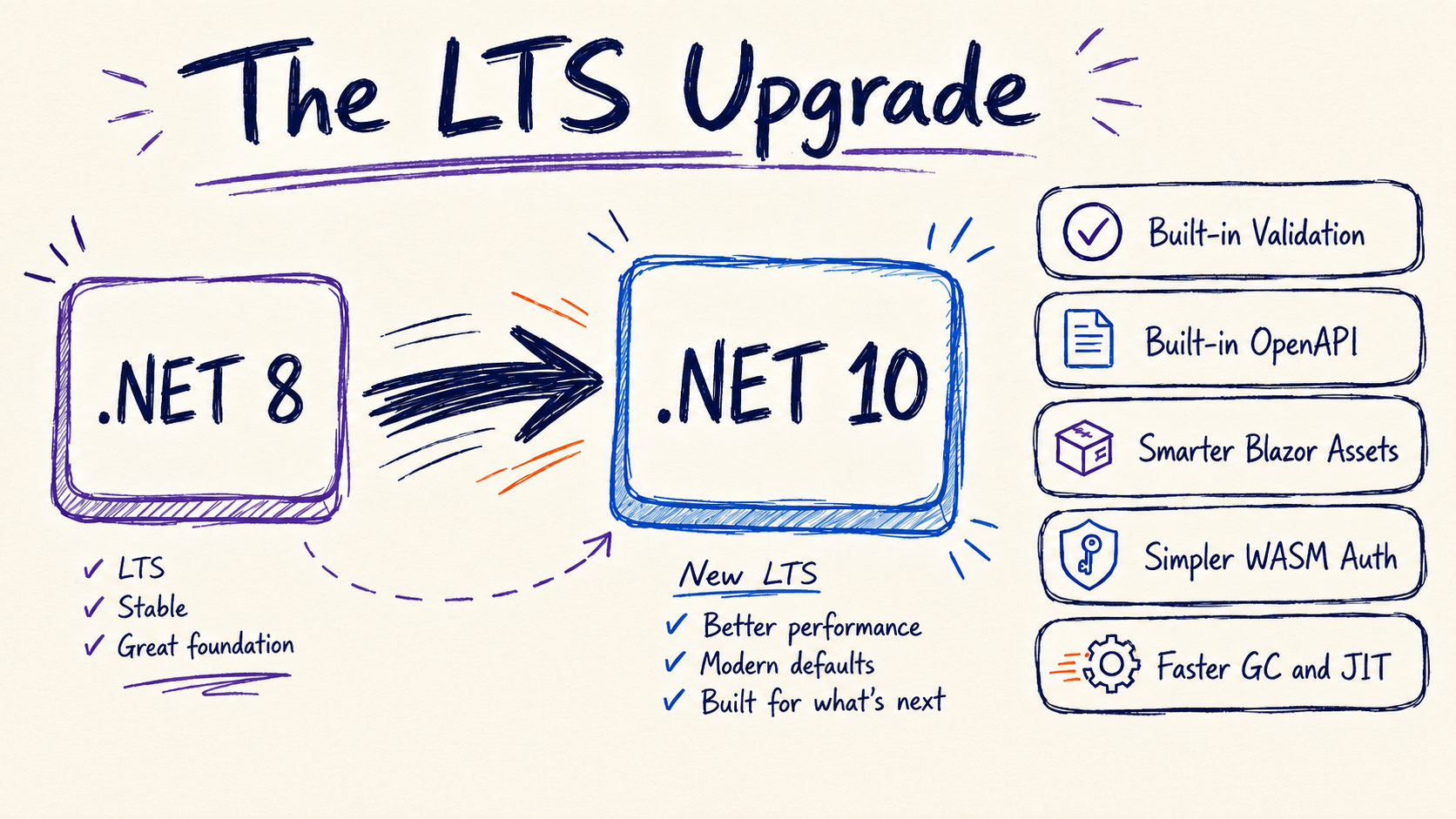
If you’re still on .NET 8 and waiting to upgrade, .NET 10 is the next stop. Most teams skip .NET 9 entirely and jump LTS to LTS, which means the move from 8 to 10 inherits 2 years of accumulated framework changes in a single bump.
And there’s more in there than I expected.
A few weeks ago I finished upgrading the entire Bootcamp from .NET 8 to .NET 10. Same .NET API, Blazor frontend, Worker service and integration test suite.
By the time I was done, I’d deleted 2 NuGet packages from every API project. I’d replaced ~110 lines of Blazor auth glue code with 2 framework calls. And I’d cut Blazor’s CSS and JS cache-busting plumbing down to a couple of lines.
None of that required new design work. I just upgraded.
Today, I’ll walk you through the changes worth caring about, the ones you get for free with the TFM bump, what stayed the same, and the upgrade checklist with the gotchas that will probably bite you.
Let’s start.
1. Validation is in the framework now
If you’ve been writing Minimal APIs, you probably have MinimalApis.Extensions installed and .WithParameterValidation() chained on every endpoint. That package’s last release was in 2023 and it targets .NET 7. .NET 10 makes both of them unnecessary.
You add one call to Program.cs:
var builder = WebApplication.CreateBuilder(args);

builder.Services.AddValidation();
And you delete .WithParameterValidation() from every endpoint:
// Before
app.MapPost("/games", (CreateGameDto dto) => { /* ... */ })
   .WithParameterValidation();

// After
app.MapPost("/games", (CreateGameDto dto) => { /* ... */ });
That’s it. Validation runs automatically for every endpoint once AddValidation() is registered, and the implementation is AOT-friendly. If you want to opt out on a specific endpoint, there’s .DisableValidation().
2. OpenAPI is in the framework now
Same story for Swashbuckle. ASP.NET Core 9 shipped first-party OpenAPI document generation, and .NET 10 added more on top. You add the Microsoft.AspNetCore.OpenApi package and replace the Swagger registration:
// Before
builder.Services.AddEndpointsApiExplorer();
builder.Services.AddSwaggerGen();
// ...
if (app.Environment.IsDevelopment())
{
    app.UseSwagger();
}
// After
builder.Services.AddOpenApi();
// ...
if (app.Environment.IsDevelopment())
{
    app.MapOpenApi();
}
The spec moves from /swagger/v1/swagger.json to /openapi/v1.json. If your app has a global authorization or fallback policy that requires auth, chain .AllowAnonymous() on MapOpenApi() so the spec endpoint stays reachable. Update any saved Postman, Insomnia, or Bruno collections to the new path.
.NET 10 added 2 things on top of the .NET 9 baseline: OpenAPI 3.1 is now the default spec version, and you can serve YAML by registering a second endpoint with a .yaml suffix:
app.MapOpenApi("/openapi/v1.yaml");
If you wrote OpenAPI document, operation, or schema transformers, the underlying OpenAPI.NET library moved to 2.0 and its type model changed. Plan a small rewrite there. Most apps never touched transformers and will see no impact.
3. Blazor static assets cache-bust themselves now
Blazor moved from app.UseStaticFiles() to app.MapStaticAssets() in .NET 9. The new API is a routing endpoint, not middleware, and it does 3 things at build time that the old middleware never did:
- Fingerprints asset URLs with content hashes so browsers cache them aggressively and a content change always busts the cache.
- Emits ETags and
Last-Modifiedheaders. - Pre-compresses files with Brotli and gzip and serves the compressed version automatically.
You change one line in Program.cs:
// Before
app.UseStaticFiles();

// After
app.MapStaticAssets();
And you reference assets through the @Assets map in App.razor:
<link rel="stylesheet" href="@Assets["app.css"]" />
<link rel="stylesheet" href="@Assets["styles.css"]" />
Two lines of code and you have a production-grade caching story for CSS, JS, fonts, and images. .NET 10 also added a <ResourcePreloader /> component you can drop into your App.razor <head> to emit preload hints for the WebAssembly boot resources. Useful for first-paint on a fresh page load.
4. Blazor form validation with nested and collection support
Blazor’s DataAnnotationsValidator has worked the same way since .NET 6. It uses reflection at runtime, it can’t see into nested objects, and it can’t validate items inside collections. .NET 10 fixes both limitations with a source-generated path.
You opt in with the same AddValidation() call from section 1 plus a [ValidatableType] attribute on your model root:
using Microsoft.AspNetCore.Components.Forms;

[ValidatableType]
public class Order
{
    [Required, MinLength(3)]
    public string CustomerName { get; set; } = "";

    [Required]
    public ShippingAddress Address { get; set; } = new();

    public List<OrderItem> Items { get; set; } = [];
}
You only annotate the root type. The validator discovers ShippingAddress and OrderItem automatically and validates their properties on submit. The attribute also turns on source-generated validation for the whole type, which is AOT-friendly and compiles down to straight-line code.
You keep <DataAnnotationsValidator /> in your EditForm. In .NET 10 it uses the source-gen path internally when [ValidatableType] is present, so nothing else in your form needs to change.
5. Server↔WASM auth state comes from the framework
If you have a Blazor Web App with a WebAssembly client, you’ve probably been carrying the 3-file pattern the .NET 8 template generated: a PersistingAuthenticationStateProvider on the server, a PersistentAuthenticationStateProvider on the client, and a UserInfo DTO in the middle that serialized claims through PersistentComponentState.
.NET 9 replaced all 3 with 2 framework calls.
On the server:
builder.Services.AddRazorComponents()
    .AddInteractiveWebAssemblyComponents()
    .AddAuthenticationStateSerialization(options => options.SerializeAllClaims = true);
On the client:
builder.Services.AddAuthenticationStateDeserialization();
The framework serializes the full ClaimsPrincipal, encrypts the payload with Data Protection, and rebuilds it on the WASM side. Delete the 3 files, delete the registrations that pointed at them, and the auth state flow keeps working.
A small thing worth knowing: the default serializer only carries name and role claims. If your app reads roles or custom claims like userid on the client, set SerializeAllClaims = true like the snippet above. The default exists because the page payload gets bigger with every claim, so opt in when you need it.
In the prebuilt Blazor frontend that ships with the bootcamp, this collapsed about 110 lines of custom glue code into the 2 calls above. Less code to own. The payload is encrypted instead of plain JSON. And roles work on the client out of the box.
6. C# 14: the language changes you’ll actually use
A few C# 14 features you’ll use right away in real codebases.
Field-backed properties. You can write a custom setter without declaring a backing field. The field keyword refers to the compiler-synthesized one:
public string Name
{
    get;
    set => field = value ?? throw new ArgumentNullException(nameof(value));
}
Null-conditional assignment. The ?. and ?[] operators work on the left side of an assignment now:
customer?.Order = GetCurrentOrder();
The right side only runs when the left side isn’t null.
Extension members. Extension properties and static extension members now work the same way extension methods do:
public static class StringExtensions
{
    extension(string s)
    {
        public bool IsBlank => string.IsNullOrWhiteSpace(s);
    }
}

// Usage
if (input.IsBlank) { /* ... */ }
There’s also nameof on unbound generics (nameof(List<>)), partial constructors and events, and lambda parameter modifiers without explicit types. Worth knowing, but you’ll use the 3 above more.
All of these come with net10.0. No package install, no flag to flip.
What you get for free across the rest of the stack
A quick list of things you get just by upgrading, no code changes required.
Exception handling is 2 to 4 times faster than .NET 8 and on by default since .NET 9 (based on the NativeAOT model). Arm64 GC pauses also dropped 8 to over 20% in .NET 10 from a write-barrier rewrite, and the JIT now stack-allocates small fixed-size arrays of both value and reference types with smarter escape analysis.
foreach over an array stops paying the abstraction cost. Array interface methods are devirtualized in .NET 10, and PGO uses profile data more aggressively across both .NET 9 and 10.
Complex types map to JSON columns now. On SQL Server 2025 / Azure SQL the new json data type is used automatically. And ExecuteUpdateAsync accepts a regular lambda, so conditional updates don’t need hand-built expression trees anymore.
No more migration races at app startup. Since EF Core 9, MigrateAsync() and dotnet ef database update automatically acquire a database-wide lock before applying migrations. If you’ve ever had 2 instances of your app start up at the same time and race to migrate the database, that race is gone.
Kestrel releases idle memory on its own. Memory pools in Kestrel, IIS, and HTTP.sys evict unused blocks during idle periods, dropping idle-time RSS automatically. And cookie auth on API endpoints returns 401 and 403 instead of redirecting to a login page.
dotnet build output looks great now. Since .NET 9, dotnet build, test, publish, restore, and friends use the new Terminal Logger by default. Color-coded warnings and errors, clickable links, per-task duration timers, and a clean summary of failures and warnings at the end.
Trusted HTTPS dev certs on Linux. dotnet dev-certs https --trust works on Linux now (Chrome, Edge, Firefox, and HttpClient). And Blazor WASM hot reload is on by default in Debug.
None of that needed a code change. You get it all just by upgrading.
What stayed the same
The architecture didn’t move. These all work the same way as on .NET 8:
- Minimal API routing, endpoint mapping, middleware ordering
WebApplication.CreateBuilder, hosting model,IOptions, configuration providers- EF Core query API, migrations,
DbContextconfiguration - JWT, cookie auth, OpenID Connect setup
- Dependency injection, logging, OpenTelemetry wiring
The .NET 8 mental model still works on .NET 10. Most of your code compiles unchanged. The upgrade is additive across every layer I’ve covered.
The upgrade checklist
A working order that minimizes the back-and-forth on a real codebase.
-
Bump
<TargetFramework>tonet10.0in every.csproj, including test projects. - Upgrade package versions across the board:
- EF Core to 10.x
- JwtBearer / OpenIdConnect / WebAssembly.Server to 10.x
- MVC.Testing to 10.x
- ServiceDiscovery and Http.Resilience to 10.4.x
- OpenTelemetry stack to 1.15.x
Build before moving on.
- Replace
MinimalApis.Extensionswith the built-in validation:- Remove the package from every API project
- Add
builder.Services.AddValidation();right afterWebApplication.CreateBuilder(args) - Delete every
.WithParameterValidation()chain call
- Replace Swashbuckle with the built-in OpenAPI:
- Remove
Swashbuckle.AspNetCore, addMicrosoft.AspNetCore.OpenApi - Replace
AddEndpointsApiExplorer()+AddSwaggerGen()withAddOpenApi() - Replace
app.UseSwagger()withapp.MapOpenApi() - If a global authorization or fallback policy is in effect, chain
.AllowAnonymous()onMapOpenApi()
- Remove
- For Blazor projects:
- Change
app.UseStaticFiles()toapp.MapStaticAssets() - Update
App.razorto reference assets through@Assets["..."] - If you have a WASM client, replace the 3 custom auth-state-provider files with
.AddAuthenticationStateSerialization()on the server andAddAuthenticationStateDeserialization()on the client. Delete the now-unusedPersistingAuthenticationStateProvider,PersistentAuthenticationStateProvider, andUserInfofiles.
- Change
- Update your CI YAMLs in 2 places:
- .NET install step: Azure DevOps
UseDotNet@2withversion: '10.x', or GitHub Actionsactions/setup-dotnetwithdotnet-version: '10.x' - Build-output paths:
bin/Release/net8.0/publishbecomesbin/Release/net10.0/publish
- .NET install step: Azure DevOps
What might bite you
A few documented behavior changes that will probably show up during a real upgrade.
Cookie auth on API endpoints returns 401/403. Unauthenticated requests to known API endpoints no longer redirect to a login URL. The handler returns the proper HTTP status code instead. Endpoints are detected automatically via IApiEndpointMetadata. If you depended on the redirect behavior, override OnRedirectToLogin and OnRedirectToAccessDenied in your cookie options.
OpenAPI 3.1 is the default. If you wrote transformers, the OpenAPI.NET 2.0 type model changed (interfaces for entities, JsonNode instead of OpenApiAny). Rewrite or pin the spec version to 3.0 with options.OpenApiVersion = OpenApiSpecVersion.OpenApi3_0 in AddOpenApi.
EF Core 10 parameterized collections. The default translation changed from a single JSON array (OPENJSON) to multiple scalar parameters. Most apps see no change. If you tuned around the old plan, restore the previous behavior via o.UseParameterizedCollectionMode(ParameterTranslationMode.Parameter) on the provider options.
EF tools with multi-targeted projects. dotnet ef now requires --framework <tfm> when the project has a <TargetFrameworks> element. Add the flag to your migration commands.
The Program class is now public for tests. ASP.NET Core 10 ships a source generator that makes the top-level Program class public when a test assembly references it via WebApplicationFactory<Program>. This removes the old public partial class Program {} boilerplate, but if your integration test project references 2 host assemblies (say, an API and a Worker) and both get made public this way, you’ll hit CS0433 because the Program type is now ambiguous across both.
There are a couple of ways to fix it. The lightest touch is to alias one of the project references in your test .csproj:
<ProjectReference Include="..\..\src\GameStore.Worker\GameStore.Worker.csproj"
                  Aliases="Worker" />
Then extern alias it in the test file that needs the Worker types:
extern alias Worker;
using Worker::GameStore.Worker;
The other option, if you’d rather not touch the test project, is to convert one of the 2 Program.cs files to an explicit class with a namespace.
Wrapping up
This is the LTS to take. The actual work is small: bump the TFM, upgrade your packages, replace MinimalApis.Extensions and Swashbuckle with the built-in versions, switch Blazor to MapStaticAssets(), and move auth state to the framework if you have a WASM client. Everything else (runtime, GC, JIT, EF Core, hosting, tooling) comes along for free.
.NET 10 LTS is supported through November 2028, which gives you a solid 2.5 years before the next upgrade.
The new edition of the Bootcamp, launching soon, includes the must-have framework updates for .NET APIs and Blazor apps from Course 1 onward.
Next Saturday I’ll go over the Aspire 9 to Aspire 13 upgrade, which also involves its own set of wins and gotchas. If you are still on Aspire 9, that one is for you.
And that’s it for today.
See you next Saturday.