Read time: 6 minutes
When I first split the Game Store app, a sample I use in my bootcamp, into microservices, I hit a problem that looked trivial: one service needed data that another service owned.
Two of those services are Catalog, which owns the games and their prices, and Ordering, which creates orders. To build an order line, Ordering needs each game’s name and price, but that data lives in Catalog’s database, not its own.
I solved it with a pattern called Event-Carried State Transfer, and wrote about it a while ago over here. The pattern is the same today. The implementation is what I’d do differently now.
Today I’ll show you a simpler, framework-free implementation, including the parts that are easy to get wrong.
A quick recap of the pattern
The simplest approach is to have Ordering call Catalog’s API over HTTP for every order. It works, but it ties Ordering’s uptime to Catalog’s: if Catalog is slow or down, so is Ordering, right on the checkout path.
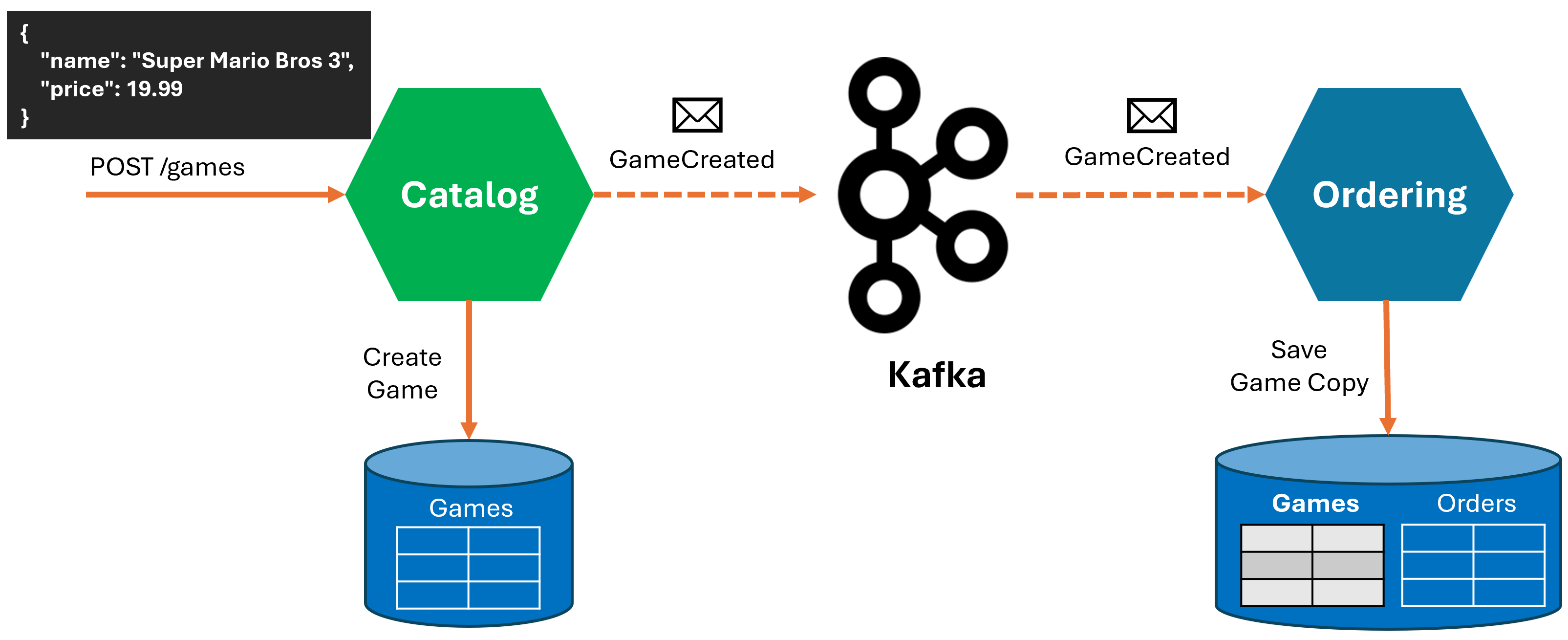
A better approach is for Catalog to publish an event whenever something changes. Create a game, it publishes GameCreated. Change a price, GameUpdated. Remove a game, GameDeleted. Ordering subscribes to those events and keeps its own local copy of the fields it needs: id, name, price, image. When it builds an order, it reads that copy and never calls Catalog.
That pattern is Event-Carried State Transfer: the event carries enough state for the consumer to do its job without calling back to the source.
No framework this time
My original version of this ran on MassTransit Riders, but MassTransit went commercial since then. I prefer to stick to free tools when I can, so this time I left it out and built the pieces myself.
I also wanted to see the moving parts. When a framework owns the consumer loop, it stays hidden inside the framework. I wanted every step to be code I could open and read, with fewer dependencies in the mix.
Here’s the publish side, from Catalog’s create-game endpoint:
var game = new Game { Name = dto.Name, Price = dto.Price, ImageUri = imageUri };
dbContext.Games.Add(game);

// Outbox the GameCreated event in the same transaction as the Game insert.
var evt = new GameCreated(game.Id, game.Name, game.Price, game.ImageUri);
dbContext.OutboxMessages.Add(evt.ToKafkaOutbox(CatalogTopics.Games, game.Id.ToString()));

await dbContext.SaveChangesAsync();
Catalog doesn’t publish to Kafka here. It writes the event into an OutboxMessages table in the same SaveChangesAsync as the game itself, so the data change and the event commit together or not at all. A background processor reads that table and publishes to Kafka afterward. (That’s the transactional outbox, which I covered in detail here.)
On the consuming side, Ordering registers a consumer for the topic and maps each event type to a handler:
builder.AddGameStoreKafkaConsumer("kafka", CatalogTopics.Games, "ordering-catalog-games")
       .Handle<GameCreated, GameCreatedHandler>()
       .Handle<GameUpdated, GameUpdatedHandler>()
       .Handle<GameDeleted, GameDeletedHandler>();
AddGameStoreKafkaConsumer is a thin wrapper I wrote over the Confluent Kafka client. It runs a background loop that reads from the topic and dispatches each message to the matching IMessageHandler<T>.
The GameCreated handler writes the game into Ordering’s own Games table, inserting it if it’s new or updating the row if it already exists:
public async Task HandleAsync(
    GameCreated message,
    string messageId,
    string? correlationId,
    CancellationToken ct)
{
    var existing = await db.Games.FindAsync(new object[] { message.GameId }, ct);
    if (existing is null)
    {
        db.Games.Add(new Game
        {
            Id = message.GameId,
            Name = message.Name,
            Price = message.Price,
            ImageUri = message.ImageUri
        });
    }
    else
    {
        existing.Name = message.Name;
        existing.Price = message.Price;
        existing.ImageUri = message.ImageUri;
    }

    await db.SaveChangesAsync(ct);
}
Surviving a redelivered message
This is the first thing MassTransit was quietly handling for me, and the first thing I had to get right myself.
Kafka gives you at-least-once delivery. The same GameCreated can arrive more than once: a rebalance, a restart, a network hiccup, and the consumer sees a message it already processed.
Two pieces keep that safe.
First, the handler looks the game up by id, then inserts it if it’s new or updates the existing row. If the same event arrives twice, the second pass writes the same values to the same row and nothing changes. The handler is idempotent by construction.
Second, the consumer loop commits the Kafka offset only after the handler succeeds:
while (!stoppingToken.IsCancellationRequested)
{
    var result = consumer.Consume(stoppingToken);
    if (result is null || result.IsPartitionEOF)
    {
        continue;
    }

    if (!await TryDispatchAsync(result, stoppingToken))
    {
        // Handler failed. Don't commit, so Kafka redelivers this offset.
        await Task.Delay(TimeSpan.FromSeconds(5), stoppingToken);
        continue;
    }

    // Handler succeeded, including its SaveChangesAsync. Now commit the offset.
    consumer.Commit(result);
}
TryDispatchAsync runs the matching handler, which is where that SaveChangesAsync happens. If it throws, the loop skips the commit, so Kafka redelivers the same message on the next poll.
If the service crashes before the commit, same result: the message comes back on restart and the handler runs again, harmlessly. The database write is the source of truth for “did this happen,” not the offset.
When the local copy is behind
The second thing I skipped back then is the cost of this whole approach: the copy is eventually consistent.
There’s a lag between Catalog creating a game and Ordering’s copy catching up. Usually milliseconds, but not zero. So a customer could order a game that Ordering’s copy hasn’t replicated yet.
So I handle this case directly. Order creation reads the local copy, and if a requested game isn’t there, Ordering returns a 503 with a retry hint instead of guessing a price:
var games = await db.Games
                    .Where(g => requestedIds.Contains(g.Id))
                    .ToDictionaryAsync(g => g.Id, ct);

var missing = requestedIds.Where(id => !games.ContainsKey(id)).ToList();
if (missing.Count > 0)
{
    return Results.Problem(
        statusCode: StatusCodes.Status503ServiceUnavailable,
        title: "Catalog projection not ready.",
        extensions: new Dictionary<string, object?> { ["retryAfterSeconds"] = 5 });
}
This is what eventual consistency actually looks like. You make the lag visible and recoverable, and the frontend retries a moment later.
It’s also a reminder that Event-Carried State Transfer fits data that’s read constantly and changes rarely, where a few seconds of staleness is fine. A product catalog is a perfect fit.
It’s the wrong tool for data that has to be exact the instant you read it, like the live game-code inventory count, which is why that part of the system uses a command and a reply instead of a cached copy.
Wrapping up
The idea is the same as before: let the owner publish changes, let consumers keep the slice they need, and read locally.
What changed is how it’s built. Without a messaging framework, the consumer loop, idempotency, and the eventual-consistency handling are all code you write and own. That’s more work, and it’s also the only way to really understand what those frameworks were doing for you.
If you want to go deeper on this, it’s one slice of a new course I built, Microservices for .NET Developers, included in the .NET 10 edition of my .NET Developer Bootcamp.
It takes a monolithic version of the game store app and splits it into Catalog, Basket, Ordering, Payments, and Notifications, then wires them together with events, the ordering saga, a YARP gateway, and Aspire.
And that’s it for today.
See you next Saturday.