Read time: 8 minutes
You clone a .NET repo. You hit F5. It crashes because something local isn’t ready: a database that hasn’t been seeded, a connection string missing from user-secrets, a service that has to be started by hand.
You fix it. F5. Crash. Fix. F5. Crash. Half a morning later, it finally runs.
Every new teammate, every laptop swap, every “I just need to check one thing” hits the same wall.
Aspire is what fixes that. And if you’ve never heard of it, or you’ve heard the name and bounced off, this post is for you.
Today, I’ll walk you through what Aspire actually is, the AppHost model, the production-ready defaults, the deployment story, and a few honest caveats.
Let’s start.
What is Aspire?
Aspire is a set of tools, templates, and packages for building observable, production-ready apps. It’s open-source, built by Microsoft, and works with whatever stack your services are written in.
In practical terms, it’s an AppHost project (the orchestrator) that defines your application model: every service, database, cache, queue, and frontend, plus how they depend on each other.
F5 boots all of it locally in one shot. The same model deploys to the cloud.
Your existing code sits next to it. You don’t rewrite anything.
The slide I use to explain it covers 4 capability areas:
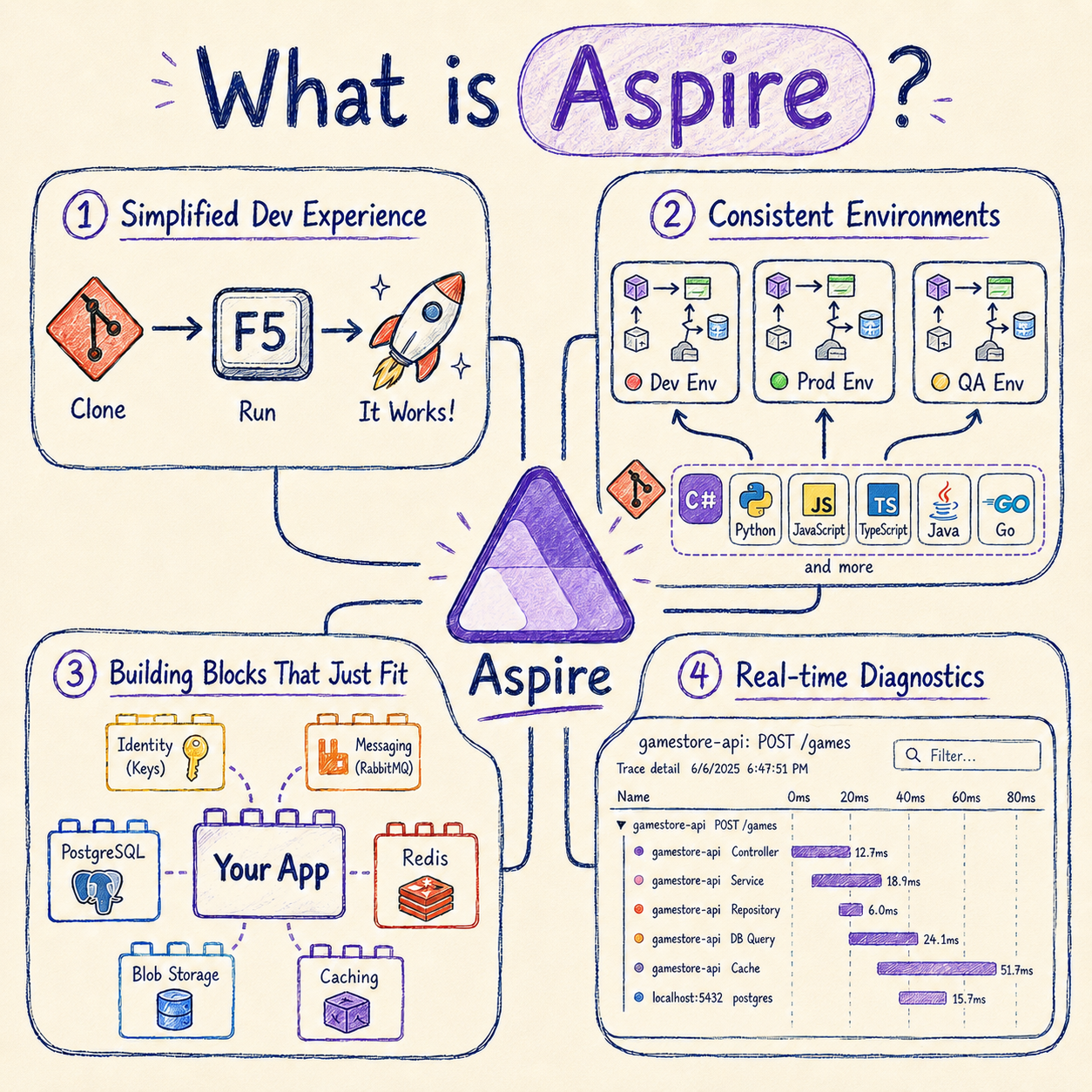
Simplified dev experience. Clone, F5, ready. The AppHost boots every service, container, and frontend in the right order. The crash-and-fix loop from the opening goes away.
Consistent environments. Dev, QA, and prod all come from the same C# model checked into git. What the team runs locally matches what ships. No “ask the senior dev which docker-compose to use” moments.
Building blocks that just fit. Drop a Postgres, Redis, key vault, or storage account into your app model in 1 line. Aspire owns the lifecycle, the wiring, and the connection strings. The bricks fit because Microsoft and the community ship them already shaped.
Real-time diagnostics. A built-in dashboard shows distributed traces, logs, metrics, and resource health across every service. First F5. No Jaeger, Prometheus, or Grafana to wire up for local dev.
Three things make all of that possible:
- Your application architecture. Defined once using your preferred language (C# for .NET apps).
- Production-ready defaults. Observability, resilience, and health checks wired into every service.
- Repeatable cloud deployments. The same model that boots locally ships to the cloud.
Let’s take them one at a time.
Defining your application architecture
The first thing you do when you adopt Aspire is write an AppHost project. For .NET apps, it’s a small C# project that uses Aspire’s AppHost SDK, and it’s where you declare every resource your system depends on: databases, caches, queues, identity providers, your own services, even raw containers.
That declaration is your application model.
Here’s part of a real one, taken from the bootcamp’s Game Store application:
var builder = DistributedApplication.CreateBuilder(args);

var postgres = builder.AddPostgres("postgres")
                      .WithDataVolume()
                      .AddDatabase("GameStoreDB", "gamestore");

var storage = builder.AddAzureStorage("Storage").RunAsEmulator();
var blobs = storage.AddBlobs("Blobs");

var keycloak = builder.AddKeycloak("keycloak", port: 8080)
                      .WithDataVolume()
                      .WithRealmImport("../../localinfra");

builder.AddProject<Projects.GameStore_Api>("api")
       .WithReference(postgres)
       .WithReference(blobs)
       .WaitFor(postgres)
       .WaitFor(blobs)
       .WaitFor(keycloak);

builder.Build().Run();
Each Add* call is a hosting integration. Microsoft and the community ship dozens of them: PostgreSQL, Redis, RabbitMQ, MongoDB, Kafka, Azure Storage, Azure Key Vault, Azure Service Bus, Keycloak, SQL Server, and more. Each one declares a resource and gives back a typed handle.
Three modifiers to know:
.WithReferencewires the connection info into the dependent project. The API gets the Postgres connection string and the blob endpoint as environment variables, with noappsettings.Development.jsonplumbing on your side..WaitForblocks startup until the dependency is healthy..WithDataVolume()keeps Postgres data acrossaspire runrestarts so you don’t reseed the database every morning.
When you hit F5, the AppHost reads this model and starts everything in dependency order:
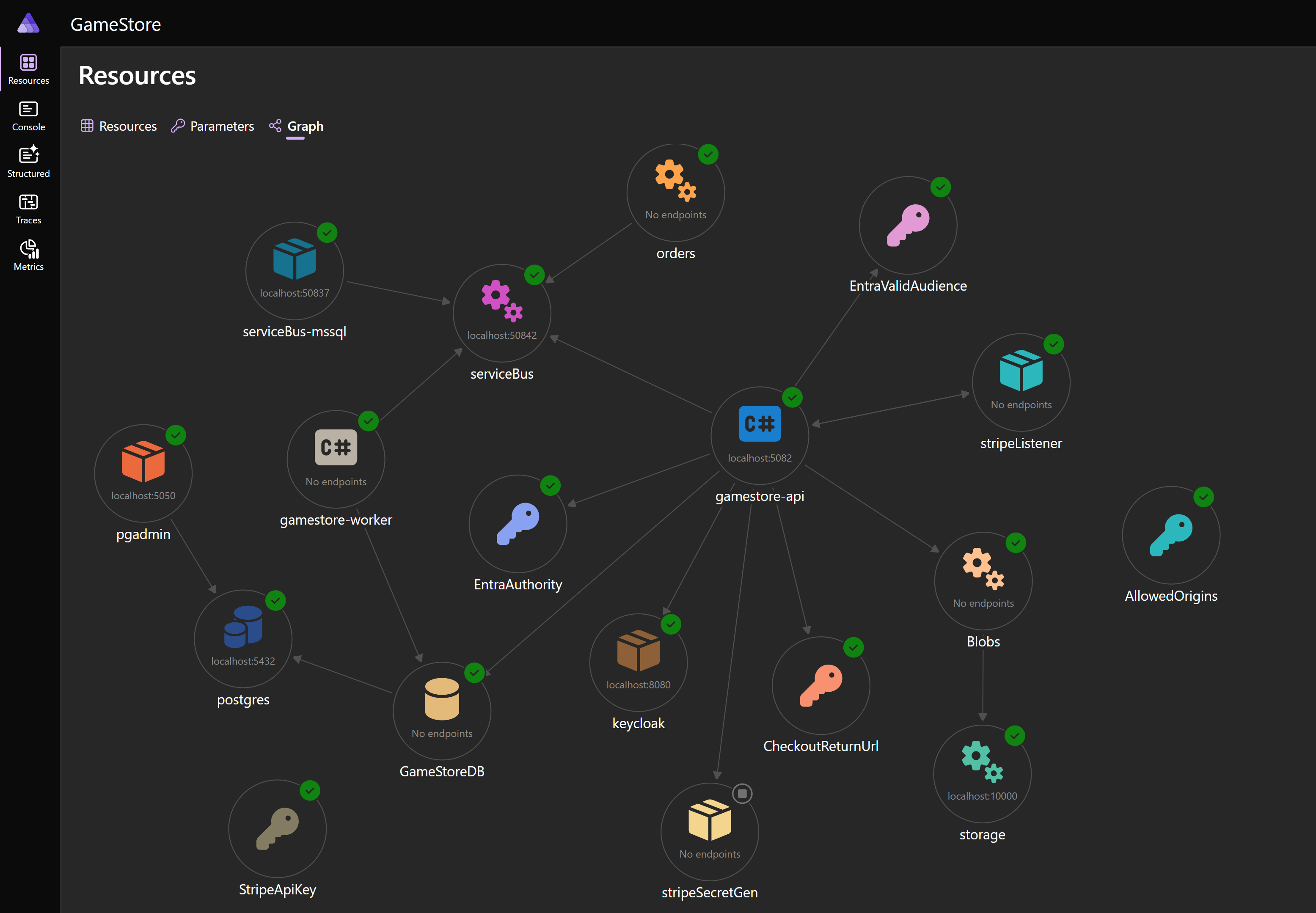
Postgres, Storage, Keycloak, your APIs, your workers. All declared once, all started together, all wired by name. No docker-compose.yml. No environment-specific shell scripts. No “first run these 7 commands” README.
The big win: the application model is C# code checked into git. Every teammate runs the exact same stack on F5, because the stack definition lives in code that everyone shares.
Production-ready defaults
A real service that talks to Postgres and Blob Storage needs DI registrations for each client, resilience policies for transient failures (retries, timeouts, circuit breakers), and /health and /alive endpoints for liveness and readiness probes.
That’s around 40 lines of boilerplate per project. Each team copies and tweaks it, and the results stop matching each other in a few weeks.
Aspire ships those defaults in 2 layers.
Layer 1: ServiceDefaults. Every Aspire solution has a shared ServiceDefaults project, scaffolded for you by the template. It exposes 2 extension methods:
builder.AddServiceDefaults();   // call this in every service's Program.cs
app.MapDefaultEndpoints();      // and this after building the app
That pair registers /health and /alive, sets up service discovery, and configures HTTP client resilience (retries, timeouts, circuit breakers). One method call per project, and every service in your solution gets the same reliability baseline.
Layer 2: Client integrations. For every hosting integration that exists, there’s a matching client integration. The hosting side declares the resource in the AppHost. The client side consumes it from the application code. Two lines in the API’s Program.cs:
builder.AddNpgsqlDbContext<GameStoreContext>("GameStoreDB");
builder.AddAzureBlobServiceClient("Blobs");
AddNpgsqlDbContext registers GameStoreContext in DI, reads the connection string the AppHost projected via .WithReference, applies Npgsql resilience defaults, and wires up a database health check.
AddAzureBlobServiceClient does the same for BlobServiceClient against the Azurite emulator locally and Azure Blob Storage in production. Same code in both environments.
All those health checks show up in the Aspire dashboard the moment you hit F5:
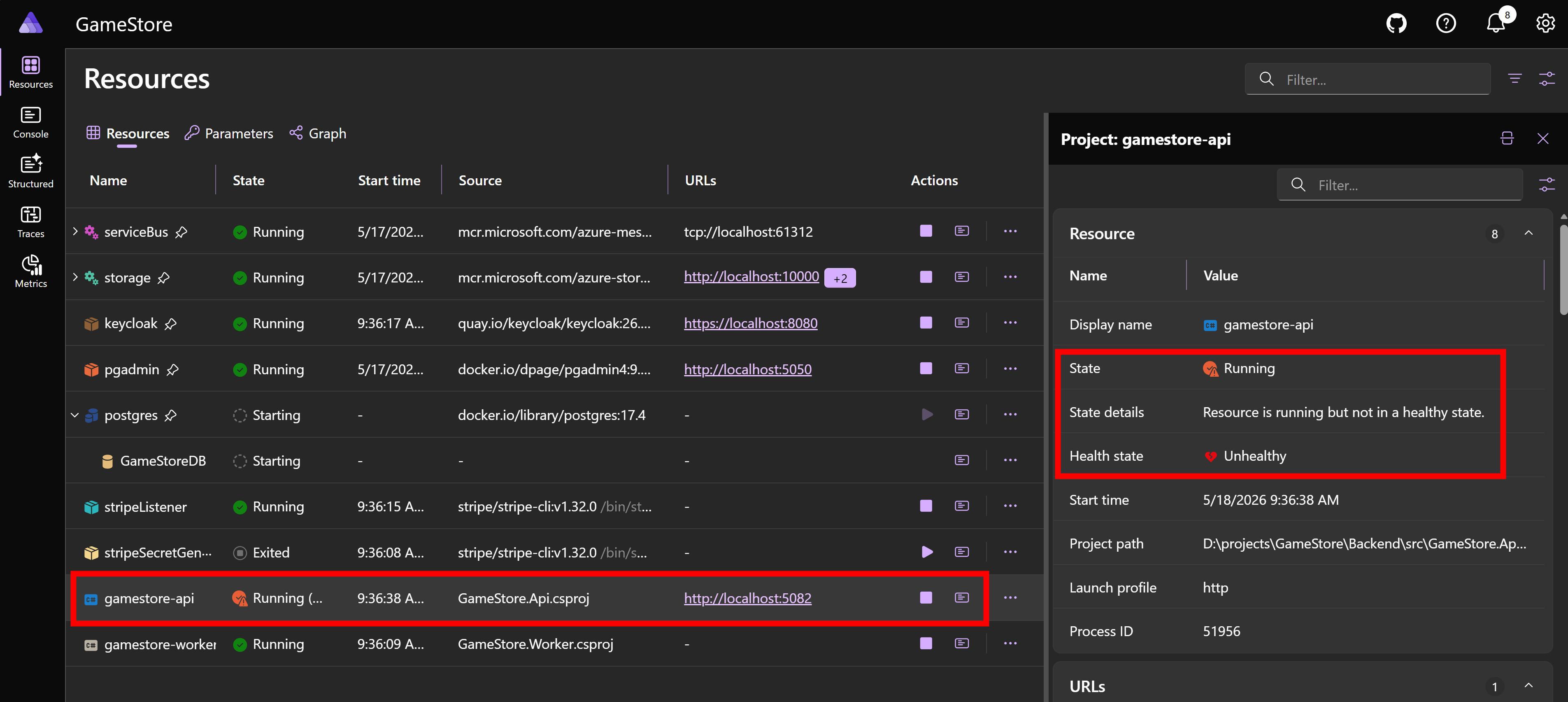
Every resource has a state and a health state. When something goes unhealthy, you see it immediately, with the failing reason 1 click away. No probes to wire up, no /health controller to write, no separate uptime dashboard to set up.
Repeatable Azure deployment
The same AppHost that boots locally also describes the production topology. Once it does, deploying is 2 commands: log in to Azure, and ship.
$ az login
$ aspire deploy
The CLI prompts for subscription, region, and resource group on first run, then walks through the deployment pipeline:
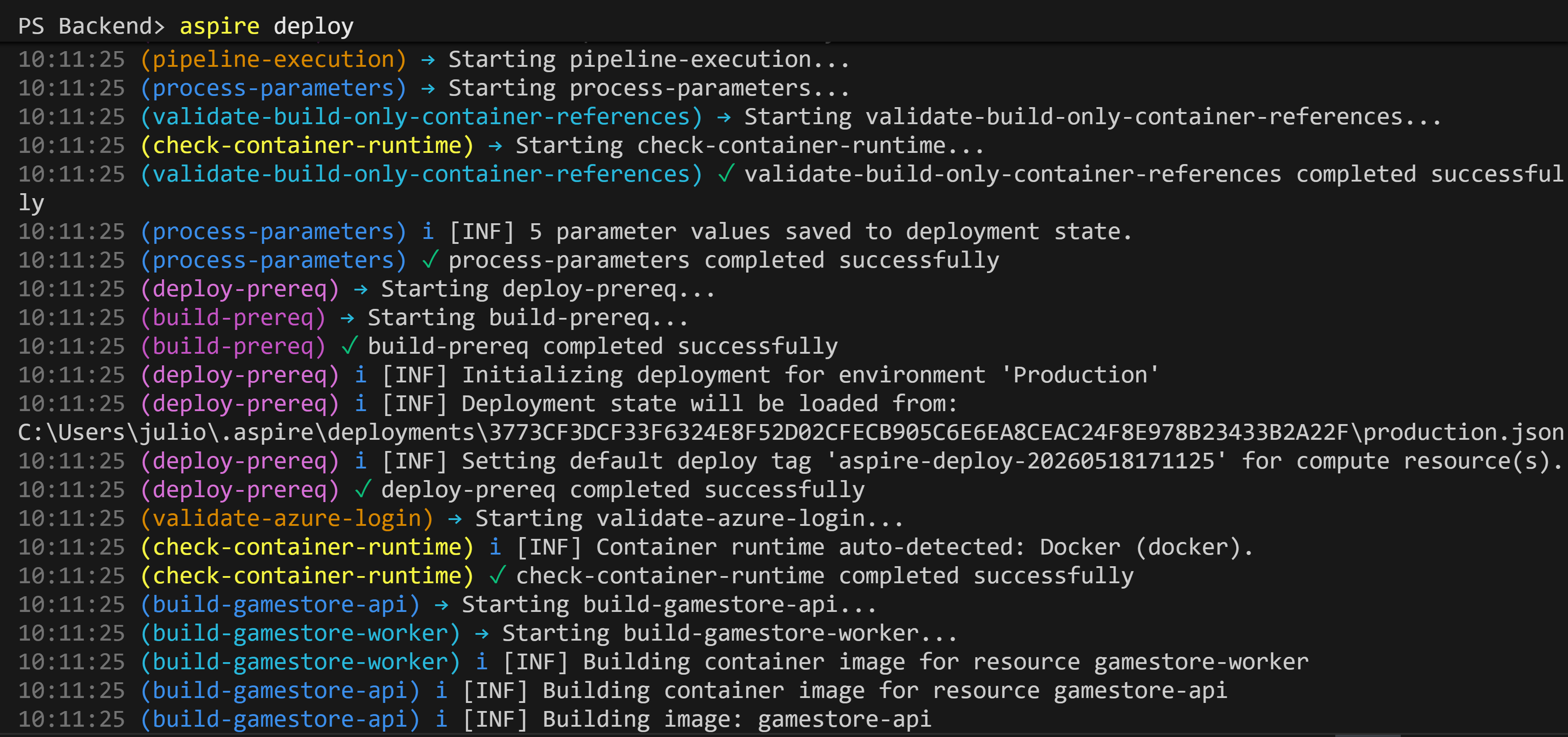
aspire deploy reads your application model, generates the Bicep, provisions the resource group and every Azure resource you declared, builds and pushes your container images to ACR, and stands up an Azure Container App for each project.
A few minutes later, the resource group is fully populated:
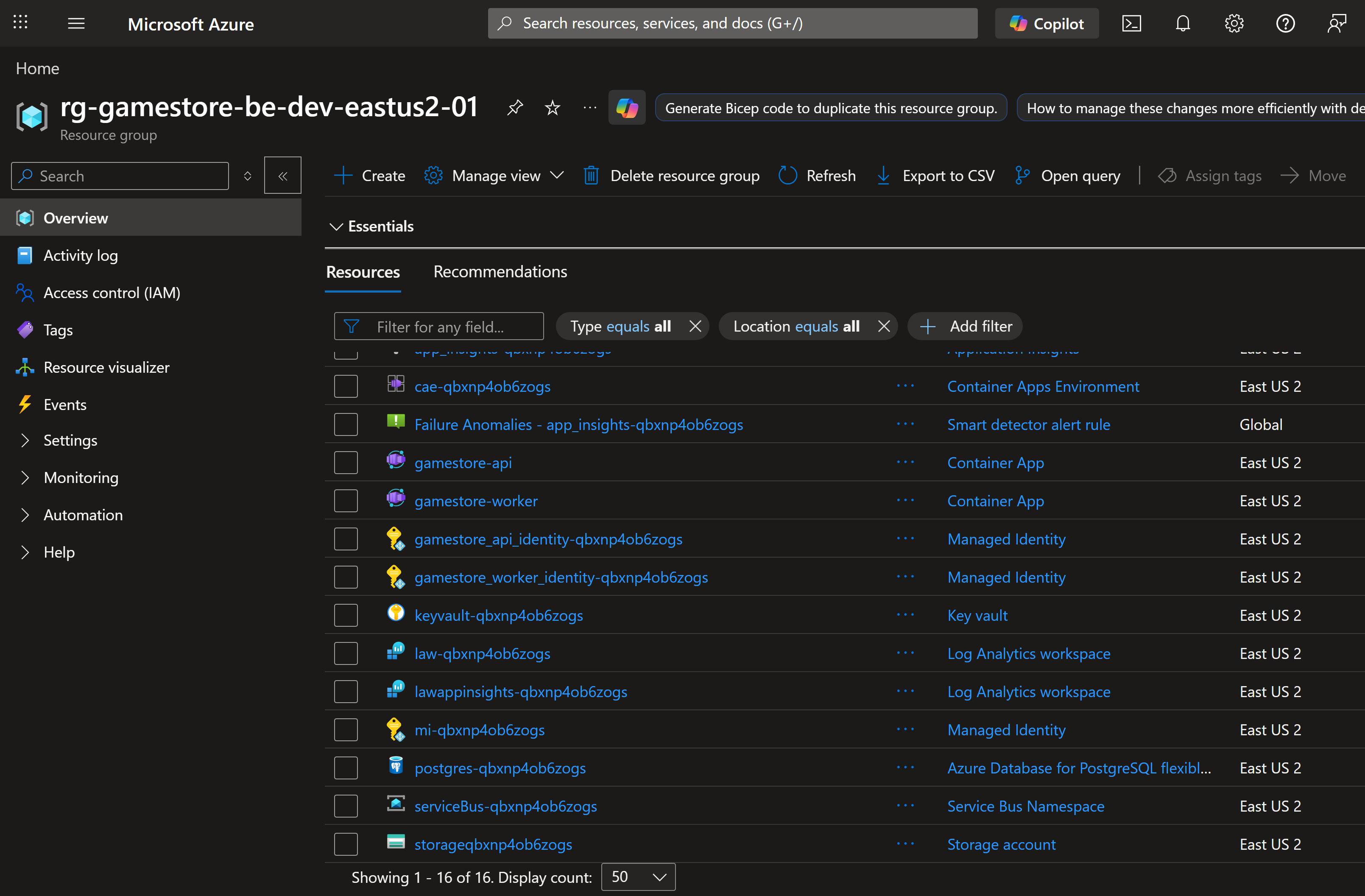
The big win: dev, QA, and prod environments come from the same C# model. Each one is a separate Aspire environment (-e dev, -e qa, -e prod), and they match each other because they all read the same Bicep generated from the same AppHost.
What ships to QA is what shipped to dev, and what hits prod is the exact same shape. Just C# in git and 1 CLI command per environment.
A few things people get wrong about Aspire
A few misconceptions I hear from people picking up Aspire for the first time:
- “It’s only for microservices.” Aspire fits any app with more than 1 moving part. A monolith with a database and a cache counts. So does a worker with a queue, or an API with a frontend.
- “It’s only for .NET apps.” The AppHost can be written in C# or TypeScript, and the services it orchestrates can be anything: Node, Python, Go, Java, raw containers.
- “It’s just docker-compose for .NET.” Docker Compose runs containers. Aspire defines an application model in code, ships production-ready defaults, gives you a live dashboard, and generates the cloud deployment from the same source.
- “It only deploys to Azure.” Azure Container Apps is the default path. Kubernetes is now first-class too. Declare a Kubernetes environment in the AppHost, run
aspire deploy, and Aspire ships your app via Helm. Docker Compose is also supported. - “It runs in production.” It doesn’t. The AppHost is dev-time only. What runs in production is your services, the containers Aspire built, and the infrastructure Aspire provisioned.
What might bite you
A few honest caveats so you know what you’re signing up for.
Single-solution friction. All projects referenced by the AppHost currently need to live in the same solution. If your team works across multiple repos with separately deployed services, you’ll feel that constraint. This is the biggest “wait, really?” moment for some teams.
The Kubernetes story is still preview. End-to-end Helm-based deploys to Kubernetes (and AKS) work, but the API surface and generated chart shape can still change. If you already own a hand-tuned Helm chart, evaluate carefully before swapping.
Testing is the biggest gap. The Aspire team has openly called testing their largest unfinished area. You can run integration tests against the AppHost, but the experience across local, CI, and different operating systems is still inconsistent. Expect to invest some time stabilizing this for your own pipeline.
Debugging into containers is limited. Your own .NET services debug like any other project, but stepping into a containerized resource (a sidecar, a custom container you wrapped) still requires more setup than it should. This is on the roadmap but not shipped yet.
None of these are blockers for most apps. They’re the kind of thing you want to know going in.
Wrapping up
If you’ve never tried Aspire, the most useful next step is to spin up the official template (aspire new aspire-starter) and hit F5.
Half an hour with it and the AppHost, the dashboard, and the production-ready defaults above will make sense.
The new edition of the Bootcamp, launching soon, includes a full standalone Aspire course built on Aspire 13, using the same Game Store sample app you saw in this post.
And that’s it for today.
See you next Saturday.
P.S. A few of you have asked when the new .NET 10 / Aspire 13 bootcamp edition lands. I’m almost done. I’ll share the exact date in next week’s newsletter.